Why am I outbid immediately in an online auctions?
During an online machinery auction, you place a bid on a machine you would like to buy. Less than a second later, you are notified that you have already been outbid. That can feel strange. Is someone constantly standing by to bid against you? Or is the system perhaps bidding against you itself?
The explanation is usually simple: another bidder has previously set up an automatic bid, also known as a proxy bid. The system then responds automatically on behalf of that bidder, up to the maximum amount that bidder has set in advance.
What is an automatic bid, auto bid or proxy bid?
Online auctions offer a wide range of machinery and business equipment, for example as a result of a machinery replacement, business closure, restructuring or bankruptcy.
With an automatic bid, you enter the maximum amount you are willing to pay for a lot. We also call this your maximum bid or maximum bidding budget.
The bidding window with the option Enable automatic bidding 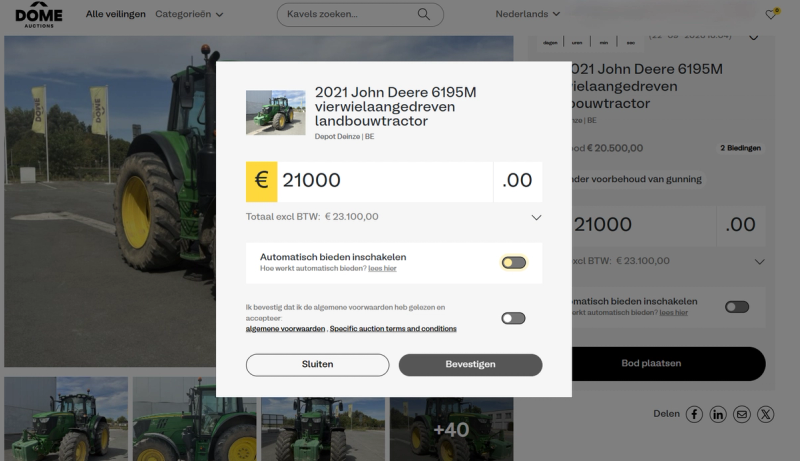
The system does not immediately place the full maximum amount. It only raises your bid when another party outbids you. Each time, the applicable bid increment is followed, until your maximum has been reached.
Your maximum bid remains confidential. Other bidders cannot see the maximum amount you are willing to pay for the lot.
Automatic bidding has two important advantages:
- You do not have to follow the auction constantly.
- You do not automatically pay the full maximum amount you have set.
As long as nobody comes close to your maximum bid, the visible bid remains lower.
What is the difference between a static bid and an automatic bid?
At Dome Auctions, you can bid in two ways.
1. A static bid
With a static bid, you enter a fixed amount. That full amount is placed as your bid.
For example, if you place a static bid of € 300, you actually place a bid of € 300.
2. An automatic bid
With an automatic bid, you enter the maximum amount you want to pay for the lot. The system then automatically bids on your behalf whenever someone else places a bid.
The system only raises your bid as much as needed to remain the highest bidder, up to the maximum amount you have set.
If someone places a static bid equal to an existing automatic bid, the automatic bid takes precedence.
How does a maximum bid work? A concrete example
Suppose a lot has a starting price of € 100 and the bid increment at that moment is € 10.
Bidder A enters a maximum bid of € 500 and enables automatic bidding. The visible bid does not immediately become € 500. For now, Bidder A is in the lead with € 100.
| Event | Set or placed bid | Visible highest bid | Highest bidder |
|---|---|---|---|
| Bidder A sets an automatic bid | Maximum € 500 | € 100 | Bidder A |
| Bidder B places a static bid | € 200 | € 210 | Bidder A |
| Bidder B places a new static bid | € 450 | € 460 | Bidder A |
| Bidder B places a static bid equal to the maximum bid | € 500 | € 500 | Bidder A |
| Bidder B places a static bid above the maximum bid | € 550 | € 550 | Bidder B |
When Bidder B bids € 200, the system automatically raises Bidder A's bid to € 210. That is one bid increment higher.
With a static bid of € 450, Bidder A also remains the highest bidder. The automatic bid is raised to € 460.
If Bidder B bids exactly € 500, Bidder A stays in the lead. The automatic bid was set earlier and takes precedence when the amounts are equal. Only when Bidder B bids more than € 500 is Bidder A outbid.
The size of the bid increments can vary depending on the current value of the lot. The principle remains the same: the system only bids what is needed, up to the set maximum.
Is the computer bidding against me?
No. The auction system does not make up bids and does not decide how much a lot should sell for.
An immediate counter-bid means that another registered bidder has already set up an automatic bid. The computer only executes that existing bidding instruction.
So you are bidding against another bidder's maximum bid, not against the computer or against Dome Auctions.
Even when you are outbid immediately several times in a row, nobody needs to be actively sitting behind a screen at that moment. As long as your bids stay below the other bidder's maximum bid, the system responds automatically.
You can view the status of your bids and followed lots in your account. See our frequently asked questions on how to follow your bids.
How do you enable automatic bidding?
The overview My followed lots showing the status of an automatic bid 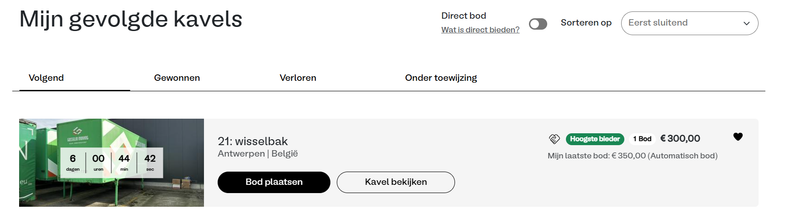
You enable automatic bidding directly in the bidding window:
- Enter the maximum amount you want to pay for the lot.
- Turn on the option ‘Enable automatic bidding’.
- Accept the applicable terms and conditions.
- Check the amount and click ‘Confirm’.
If you leave the option turned off, you place a static bid for the full amount you entered.
Would you first like to know how the complete bidding process works? Read in our FAQ how to place a bid at Dome Auctions.
Why can't you see another bidder's maximum bid?
An automatic bid is confidential. If all maximum bids were visible, other bidders could see exactly how much they would need to bid to outbid someone. That would influence the bidding process.
That is why you only see the current bid and the next possible bid increment. This way, every bidder decides independently what a machine, vehicle or other industrial item is worth to them.
How do you set a sensible maximum bid?
Decide in advance the maximum you want to pay for a lot. Keep in mind that a buyer's premium and VAT, among other things, may be charged on top of your bid. Also consider any costs for dismantling, loading and transport. In our FAQ you can read how the total price of your bid is calculated.
By setting your absolute limit in advance, you avoid getting carried away while bidding. The system can bid automatically on your behalf, but it never goes above the maximum amount you entered yourself.
Transparent bidding at Dome Auctions
At Dome Auctions, we think it is important that buyers understand exactly how an online auction works. Our team combines decades of experience in the industrial auction sector with transparent and user-friendly technology.
An automatic counter-bid is therefore not a hidden trick. It is a tool that lets every bidder set their own limit in advance and easily take part in an online auction.
Want to experience online bidding for yourself? View our current online industrial auctions or create an account to bid on machinery, vehicles and business equipment.